This article is also available in Chinese閱讀中文版 →
I Built an AI Meeting Notes Tool in 4 Hours for $0.32/hr
After every meeting, how much do you actually remember?
If you’re like me, probably the big picture — and maybe half the details.
You can’t take notes and have a real conversation at the same time. By the time you’re typing, they’ve already moved on. You prepared an agenda beforehand, but you can’t flip through it mid-conversation. And after the meeting? You tell yourself you’ll write it up later. A day passes. The details are gone.
There are AI meeting tools out there, but they cost $10-30/month and your meeting notes end up stored on someone else’s cloud.
So I built my own.
Four Hours, Idea to Prototype
My personal system already had AI plugged into email, goal tracking, and knowledge management.
But meetings were still a gap.
Every time I had a call, I couldn’t take notes — I’d tried. I’d prepare a playbook beforehand (a meeting battle plan — who they are, background context, specific goals, key questions to ask), but having it open on the side doesn’t really work when you’re trying to hold a conversation.
At first, I just wanted one thing: transcribe the audio and auto-generate meeting notes. Feed the transcript and playbook to AI, get structured output — decisions, action items, key discussion points.
But then it hit me: I already have the playbook and a live transcript. Why not have AI give me suggestions during the meeting?
One click, real-time tactical advisor.
I press a button on my second monitor. The system sends the playbook and the last fifteen seconds of transcript to Claude. A few seconds later, it sends back a suggestion — based on my prep and what’s actually happening in the conversation. Sonnet responds in 3-4 seconds, Opus takes 5-10 but gives better advice. Depends on the situation.
Four hours later, it worked.
What It Looks Like
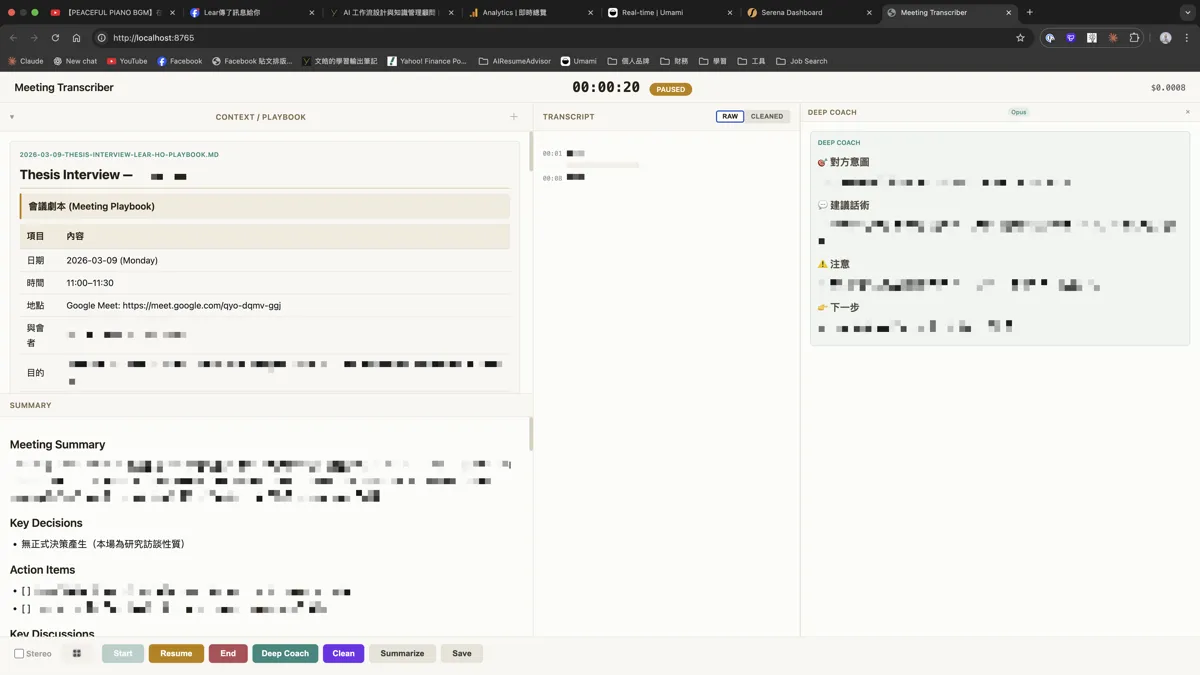
Three-panel web interface:
Left panel: Playbook
Your meeting battle plan — who they are, background context, specific goals, key questions to ask. Upload a Markdown file.
Center panel: Live Transcript
During the meeting, speech-to-text processes audio in 10-second chunks. For virtual meetings, stereo mode separates both speakers into different channels — the transcript labels who’s talking.
Right panel: AI Tactical Advisor
This is the key feature.
Any time during the meeting, hit a button. The system sends the playbook and recent conversation to Claude Opus. A few seconds later, you get a suggestion.
I was talking to a Minerva alum about this tool, and he immediately connected it to our school’s instructor interface — Minerva instructors have a built-in playbook with the entire class flow, giving hints when the teacher needs them.
He said: “The traditional teaching manual is basically a pre-written script that gives hints when the teacher needs them. But what happens in class is never what you planned.”
That’s exactly the gap the AI tactical advisor fills. The playbook is a fixed framework. The AI adapts to what’s actually happening.
He summed it up: “What you want to talk about is decided ahead of time, but the moment requires improvisation, and you have two seconds to react.”
You can’t ask ChatGPT. No time to switch windows and type. It’s one click, two seconds, done.
And near the end of the meeting, you can have the AI check against your playbook: I listed three goals before the meeting — how many did I cover? What’s still missing?
$0.32 Per Hour
Here’s the cost breakdown:
| Component | Tool | Cost |
|---|---|---|
| Speech-to-text | Qwen3-ASR | ~$0.32/hr |
| Transcript cleanup | Claude Opus | $0 |
| Meeting summary | Claude Opus | $0 |
| Real-time tactical advisor | Claude Opus | $0 |
| Total per hour | ~$0.32 |
Why is Claude Opus (Anthropic’s most capable model) free?
I use a Claude Code subscription. Anthropic’s subscription plans (Pro $20/mo, Max $100 or $200/mo) include API usage. So whether I use Opus for transcript cleanup, meeting summaries, or the real-time tactical advisor, there’s no extra charge.
The only variable cost is speech-to-text. I use Alibaba’s Qwen3-ASR at $0.00009/second — about $0.32 per hour.
Compare that to SaaS alternatives:
| Tool | Monthly Cost | Pre-meeting Prep | Real-time Advice | Data Processing |
|---|---|---|---|---|
| Otter.ai | $16.99/mo | None | None | Cloud |
| Fireflies | $18/mo | None | None | Cloud |
| Krisp | $16/mo | None | None | Cloud |
| Jamie | €25/mo | None | None | Cloud |
| This tool | $0.32/hr | AI-generated playbook | Real-time tactical advisor | Local storage |
These tools do “transcribe during + summarize after.” Mine adds two layers: before the meeting, AI auto-generates a playbook from my calendar, emails, and project status; during the meeting, it gives tactical advice based on the playbook and live conversation — powered by Claude Opus, Anthropic’s most capable reasoning model. Audio clips go to the speech-to-text API, text goes to Claude for processing — but recordings and meeting notes stay on your machine. Nothing is stored on third-party servers.
Beyond Meetings
After building it, I started seeing more use cases.
That Minerva alum rattled off several during our conversation:
Consulting. Research the client beforehand, write a playbook. Mid-meeting, the AI reminds you there’s a topic you haven’t covered yet.
Education. The teacher’s playbook is the lesson plan. During class, AI gives hints based on student reactions and class progress — not teaching for them, just a nudge when they need inspiration.
Interviews. Whether you’re the interviewer or candidate — JD, resume, company research, all of it is context. The AI reminds you what to ask or add based on the live conversation.
Therapy, facilitation, coaching. Any scenario where you’ve prepared but need to improvise.
The common thread? A fixed framework (playbook), an unpredictable live situation, a need to react in seconds, and no time to look things up.
The value isn’t in transcription — transcription is just infrastructure. The value is in the combination: playbook + live conversation → AI tactical advisor.
Technical Choices
The tool has two model layers: speech-to-text (audio to transcript) and text processing (cleanup, summaries, real-time tactical advice). Different selection logic for each.
Speech-to-Text: Qwen3-ASR
Mixed Chinese-English recognition is a hard requirement for me. At least half my meetings are bilingual. Qwen3-ASR natively supports 52 languages and 22 Chinese dialects. Its mixed-language quality is the best I’ve tested so far — not perfect, still evaluating others. Cost is just $0.32/hr.
I built a swappable engine system — Qwen, Soniox, OpenAI, Groq. Not locked to any provider. If something cheaper or better comes along, one config change.
Text Processing: Claude Opus (Subscription)
Transcript cleanup, meeting summaries, real-time tactical advice — all Claude Opus. Why not call the API directly? Because the Claude Code subscription includes API usage. Direct API pricing for Opus is $15/M input tokens + $75/M output tokens. A one-hour meeting would cost $5+ just for summaries and tactical advice. The subscription makes that zero.
Stereo audio.
For virtual meetings, I use BlackHole to capture system audio, routing the microphone and remote speaker to separate channels. The transcript automatically labels who’s speaking. This makes a huge difference in meeting notes quality — you know who said what.
Integrated Into My Workflow
This tool doesn’t exist in isolation. It’s part of my entire AI second brain.
Before the meeting. I type /meeting prep. AI pulls context from my calendar, recent emails, and project status. Three minutes later, I have a playbook draft. I review it, make edits, done. This is a Claude Skill — write once, auto-apply before every meeting.
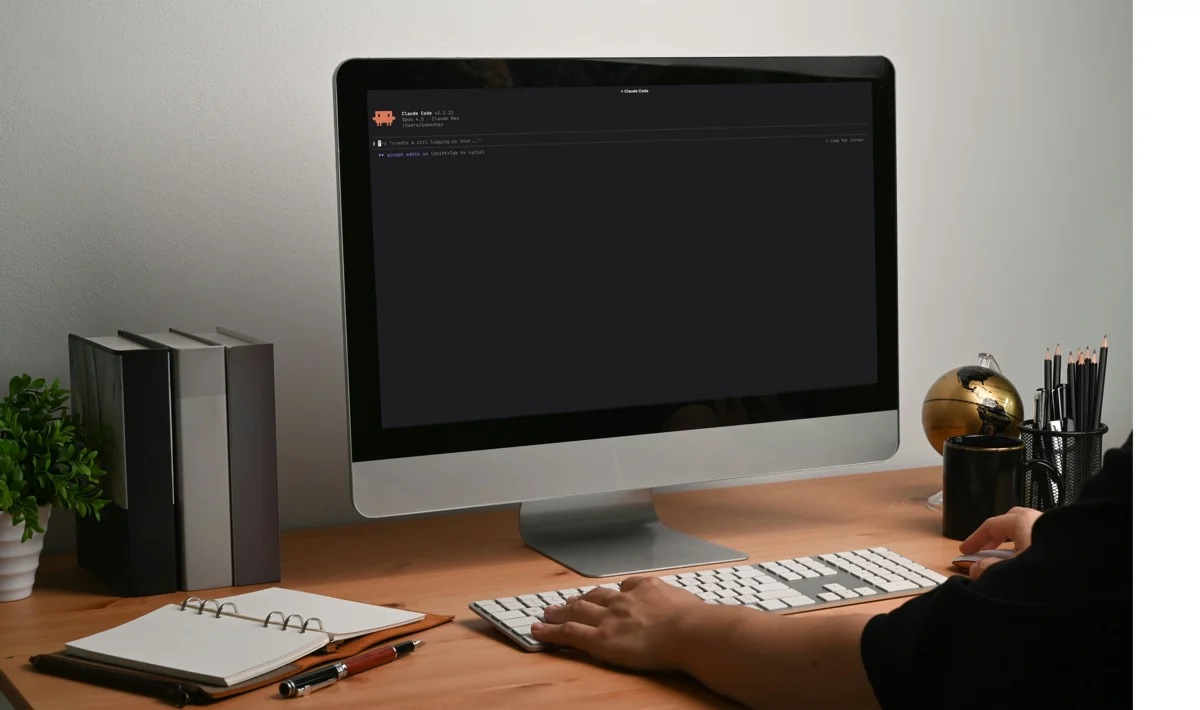
During the meeting. Open the web UI, select the playbook, start recording — three seconds. Live transcript + AI tactical advisor running on the second monitor.
After the meeting. Hit “Summarize.” Claude generates meeting notes from the transcript and playbook — summary, decisions, action items, key points. Hit “Save,” and it goes straight into my goal and project management system.
Knowledge loop. Finish a client meeting, and the notes auto-file into the right project folder. AI asks: “There are three action items — schedule them this week or just note them?” You decide. Next morning, your daily brief reminds you: “You promised the client a quote yesterday — haven’t sent it yet.” Next time you meet the same client, the playbook auto-loads last meeting’s decisions and follow-through.
From “a transcription tool” to “part of the workflow” — what’s the difference?
Meetings are no longer an island. Every meeting’s output becomes the next meeting’s input.
Final Thoughts
Before the meeting, AI prepares the playbook — I decide which goals stay. During the meeting, AI advises — I decide how to respond. After the meeting, AI organizes the notes — I confirm and file.
Judgment and direction are my job. Everything else is the system’s.
My AI workflow already covers email, goal management, knowledge base, and content creation — I call it my AI second brain. But after every meeting, I still had to write up notes manually. That gap was always leaking. A four-hour prototype plugged it.
I built this for myself. But every time I mentioned it to someone, they asked the same question: “Could this work for my company?” It’s still a prototype — there’s a long road from a one-person tool to a product. But if you think this thing should exist — whether as an early user, enterprise adoption, or building it together — let’s talk.
If this sparked an idea, subscribe to my weekly letter — I write about AI workflows and the things I figure out along the way.
FAQ
- How much does this tool cost?
- About $0.32 per hour of meeting. Since I already use a Claude Code subscription for my daily work, transcript cleanup, summaries, and the real-time tactical advisor are all included — the only extra cost is speech-to-text (~$0.32/hr).
- How is this different from Otter.ai or Fireflies?
- SaaS tools charge $10-30/month for transcription and summaries. This tool adds a real-time tactical advisor — one click during the meeting to get suggestions based on your playbook and the live conversation. Recordings and notes stay on your machine — nothing stored on third-party servers.
- Can others use this tool?
- This is a personal prototype I built for my own use — it's not a commercial product. If you're interested in this direction — whether it's enterprise adoption, product collaboration, or just discussing how to build something similar — feel free to reach out.
- What languages does it support?
- 52 languages and dialects, with strong mixed Chinese-English recognition.