This article is also available in Chinese閱讀中文版 →
How I Built an AI Second Brain with Claude Code + Obsidian

Every January, I set New Year goals.
“This year I’ll work out. Write more. Ship that product.”
Then what?
February: still on track. March: busy, let me pause. June: “Wait, did I set goals this year?” December: “Forget it, next year.”
I’ve been playing this script for years.
OKR, GTD, 12 Week Year — I’ve tried every time management and productivity system out there. They all have the same problem: exciting to set up, frustrating to maintain.
Because you have to remember to check. Remember to update. Remember to track.
“Remembering” itself is the burden.
How much did I spend this month? How many goals did I hit last week? That flag I planted three months ago — where’s the progress?
I don’t know.
Data scattered across apps. To-dos living in six different places, none of them complete.
The problem isn’t willpower. The problem is not being able to see yourself.
Not being able to see where you are, where you’re going, or how far you have left.
The Turning Point
Late last year, I came across a post on X. 700,000 views. 4,000+ bookmarks.
The author, Molly Cantillon, pointed out that Facebook, YouTube, and Google already see us clearly — they know what we like, what we buy, when we sleep. Our lives are already being watched. Just not by us.
So she built her own system. Eight AIs running simultaneously, each managing a domain: product, email, investments, health, writing. She called it Personal Panopticon — AI helping her see the full picture of her own life. Every morning, AI auto-generates a brief. Email hits Inbox Zero. It even dug up $2,000 in subscriptions she didn’t know she was paying.
After reading it, I thought about it for a long time. Not “wow, impressive” — more like: the problem she solved is exactly my problem. Not being able to see myself. She built a mirror with AI. A mirror that shows her finances, health, and progress.
I wanted that mirror too.
So I started building my own AI second brain. Three months later, it grew from an empty folder into a complete system.
Before the System: Three Design Principles
Tools change, AI models get updated, services raise prices — but principles don’t.
Programmable infrastructure. All files in Markdown. Plain text, cross-platform, AI can read and write directly. I use Obsidian for my knowledge base, not Notion — Obsidian notes are local .md files that Claude Code can operate on directly. First thing I check when choosing a service: does it have an API? No API means your data is trapped. If your infrastructure isn’t programmable, AI — no matter how smart — can only answer questions in a chat window. It can’t touch your data or change your system.
Data-driven decisions. This is something Minerva University taught me — without data, you’re guessing; with data, you’re deciding. But most people’s data is scattered everywhere. I don’t want to open five websites and stare at dashboards. What I want is: AI reviews all the numbers and tells me “what needs attention.” So the core of the system is — centralize data, AI analyzes, human decides.
AI-automated execution. Do something once: do it manually. Do it twice: consider automating. Three times or more: automate it. Time should be spent on decisions, not execution. AI automation changes the entire rhythm of work — from “I go do things” to “the system finished running, I make decisions.”
Morning: Two Words to Start the Day
Every morning, I type two words: “Let’s go.”
Claude Code automatically runs through 8 steps — reviews what I did yesterday, checks this week’s goal progress, syncs the latest status across four projects, pulls today’s schedule from Google Calendar and iCloud Calendar, scans Gmail and iCloud Mail, grabs trending content from Reddit and Hacker News, builds today’s task list — then color-codes every item:
- 🟢 Green: AI suggests an action, I approve and it executes (Unsubscribe from this spam? Archive this expired task?)
- 🟡 Yellow: AI prepared options, I pick (Two ways to reply to this email — which one? Three article topic candidates)
- 🔴 Red: I handle it personally (2 PM client meeting — but the Playbook is already prepared)
- ⚪ Gray: No action needed today (Waiting for a reply, deadline is next week)
Three minutes later, it asks: “What do you want to start with?”
I scan the greens first — approve what makes sense, skip the rest. Then the yellows — pick options, close them out. All done within five minutes. The rest of the morning is just the red items: open the Playbook to prep for the afternoon meeting, think through how to write that article, decide the next move for the product.
No opening Gmail. No opening Calendar. No opening Trello. No opening six apps trying to remember what happened yesterday.
Before this, I spent an hour every morning “getting ready to work” — checking email, checking calendar, checking to-do lists, scrolling feeds, trying to recall yesterday. Information everywhere, all needing to be collected and prioritized by me.
Now I make all my decisions in five minutes, then start working. What I save isn’t just time — it’s cognitive load. Fifty fewer “should I deal with this now?” micro-decisions per day. Brainpower reserved for what actually matters.
What about when I’m away from my computer? I built a Telegram AI assistant called OpenClaw that auto-pushes a Daily Brief to my phone every morning — what’s still undone from yesterday, today’s calendar, any emails that need attention, what AI suggests I prioritize. At 6:45 AM, phone buzzes, two-minute scan, and I know exactly where the day stands.
During Work: Email, Meetings, Knowledge Base
Three things used to drain the most energy during my workday: email, meetings, and finding information. Now AI handles all of them.
Email: From 40 Minutes to 10
My inbox used to look like this: 147 unread, maybe 3 important, but finding them took 40 minutes.
Every email forces a micro-decision: Important? Reply? Reply now? Make 50 of those per day and your brain is spent.
Now the system auto-scans, categorizes, and drafts replies overnight:
3 important emails today:
- Client A asking for a quote — draft reply ready, suggest sending today
- Partner B confirming Thursday meeting — confirmation draft ready
- Bank notification: credit card payment due
Drafts are already sitting in my drafts folder. I open email, glance, change two words, hit send. No starting from scratch.
And if an email contains an action item — “Please send the quote by Friday” — the system automatically adds it to this week’s Work Items. Not because I remembered to add it. Because it read the email and added it for me. “Forgot to reply to that email” used to be my most common mistake. Now it’s impossible — it’s on the task list, and the Brief reminds me too.
Meetings: No More Lost Details
After every meeting, how much do you actually remember? The big picture, sure. Half the details are gone. Take notes while meeting? While you’re typing, they’ve already moved to the next point.
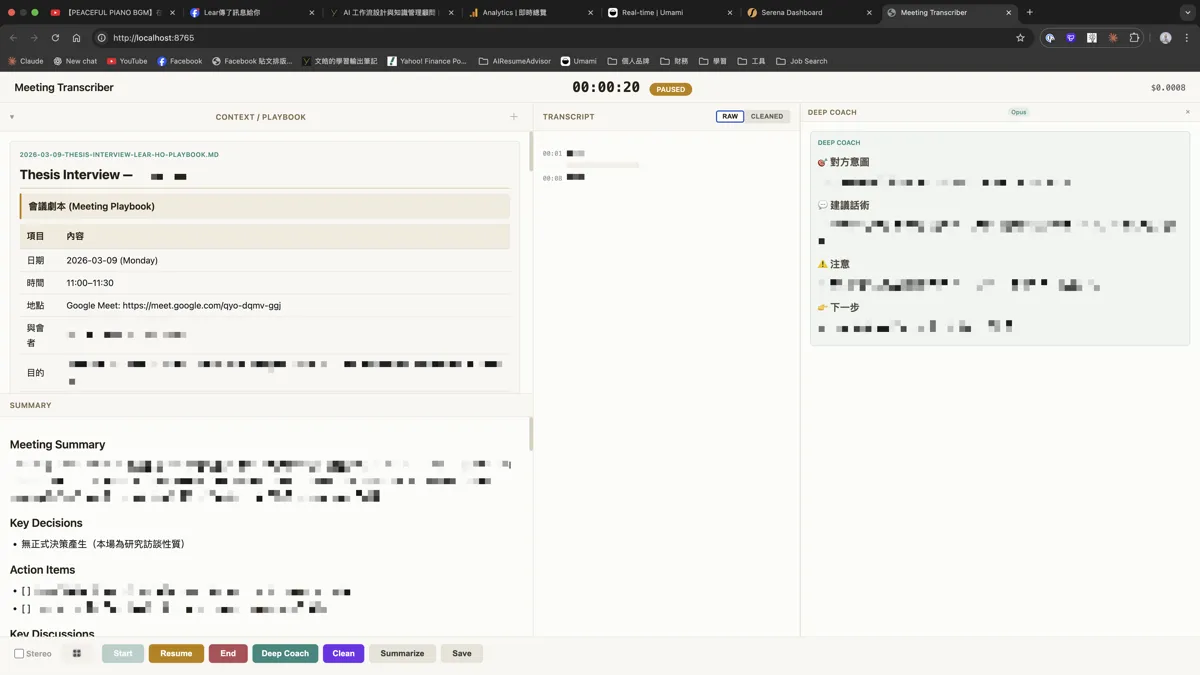
I built an AI meeting notes tool and integrated it into my workflow.
Before the meeting, I type /meeting prep. AI pulls context from my calendar, emails, and project progress, then generates a Playbook in three minutes — what to discuss, meeting objectives, who’s attending, past interaction history. This is a Claude Skill — write it once, it runs automatically before every meeting.
During the meeting, real-time speech-to-text produces a live transcript. The key feature is the “AI tactical advisor” — press a button and the system analyzes the Playbook against the live conversation, delivering suggestions within seconds. You don’t find out “I should’ve asked that question” after the meeting. You get prompted in real time.
After the meeting, press “Summarize.” AI generates meeting notes from the transcript and Playbook — summary, decisions, action items. Press “Save” and it’s automatically stored in my goal and project management system. Next time I meet the same person, the Playbook already carries the context from last time.
Meetings are no longer islands. Every meeting’s output becomes the next meeting’s input.
Knowledge Base: The AI Second Brain
How many notes do you have? 500? 1,000? When was the last time you actually found that note you wrote three months ago?
The problem isn’t too few notes. It’s too many to find.
Knowledge management starts with organization. I use the LYT framework in Obsidian — instead of folder hierarchies, you link related notes together. Knowledge isn’t a tree. It’s a network.
But LYT only solves “how to organize.” AI solves “how to use.”
Claude Code can search my entire knowledge base — thousands of notes, one second. Not keyword search — semantic search. I say “find my notes about pricing strategy” and it pulls relevant content from different folders, different dates, different contexts.
Prepping for a meeting? It pulls past meeting notes, related project progress, articles I’ve read on the topic. Three minutes, and I have a contextualized briefing. Used to take 20 minutes just to “remember.”
Writing an article? It finds notes from a book I read three months ago, a perspective I jotted down after a conversation last month, a Reddit discussion summary from two weeks ago. These materials were already in my knowledge base. I just didn’t remember they existed.
Making a decision? It finds my past thinking on similar problems. Three-months-ago you already thought about this — you just forgot. AI helps you remember. You’re not starting from zero. You’re standing on the shoulders of your past self.
My knowledge base is no longer a “save and forget” filing cabinet. It’s become an AI second brain that proactively retrieves what I need — not helping me “store,” but helping me “remember.”
Anytime: Capturing Ideas
Great idea in the shower. “I need to write this down when I get out!” Then you get out and it’s gone.
Waiting for the bus and thinking of a feature to add. Hearing an interesting perspective from a friend. Figuring something out right before falling asleep. If these ideas aren’t captured within 30 seconds, they vanish.
Now whenever something comes to mind, I just message OpenClaw on Telegram. No categorizing, no organizing, no opening any app. The system auto-saves it to the knowledge base inbox.
It’s not just capture. Scrolling through social media and seeing an interesting claim? I send it to OpenClaw: “Fact-check this for me.” It researches and replies. I follow up. A few rounds later, by the time I’m home, the idea is 70-80% developed. Open my laptop, Claude Code reads the OpenClaw conversation log, seamless handoff.
My brain gets to be empty. You never need to “remember” anything — just dump it in. The next morning when you start the day, the system automatically reminds you to process it.
Creating: From Inspiration to Publishing
The hardest part of writing isn’t writing. It’s not knowing what to write about.
I used to spend 1-2 hours scrolling Reddit, Hacker News, and X looking for interesting discussions. I’d scroll, lose track of why I was scrolling, and end up with nothing. Time spent, no inspiration captured.
Now the system auto-scrapes trending content every night, AI filters for what’s relevant to me, generates summaries, and categorizes whether it’s better for social media or blog. By morning, inspiration is waiting in my Brief:
Content ideas today:
- Reddit: Solo founder hitting $10K MRR — good for social post
- @levelsio: AI coding observation — could write my take
Once I pick a topic, Claude Code searches my knowledge base’s MOC index for related material — past notes, articles I’ve read, perspectives I jotted down from conversations. If it can’t find enough, it searches the web and turns new findings into knowledge cards that go back into the system.
The article you’re reading right now — the Molly Cantillon reference, the design principles, the details of each module — most of the source material was pulled from my knowledge base by Claude Code. No re-researching required. These materials were scattered across different notes, different dates, different folders. I had no idea they existed. But AI remembered.
Every article I write adds a few more cards to the knowledge base. Next time I write on a related topic, the materials are already there. The more you use it, the richer it gets. Compound interest.
Weekly: Course-Correcting with 12 Week Year
Everything I described above — morning Briefs, email processing, meeting notes, knowledge base, content creation — that’s the daily execution layer. But no matter how smooth your execution is, if you’re headed in the wrong direction, you’re just efficiently walking the wrong path.
So the backbone of the entire system is goal management.
I use 12 Week Year for goal setting. The core concept: a year is too long — your brain automatically switches to power-saving mode. Treat 12 weeks as a full year. Creates urgency. 12 weeks is short enough to force focus. Long enough to accomplish something meaningful. You get 4 fresh starts per year.
The most important thing this framework taught me: track Leads, not Lags.
I used to only watch results — “Revenue must grow 20% this month!” Then I’d stare at numbers every day, anxious about why they weren’t moving. Numbers aren’t something you can control. What you can control is action.
Now I track actions — “This week: publish 2 articles, reach out to 5 clients, ship 1 product feature.” If I do them, results are a byproduct. If I don’t, I need to figure out why: task too big and needs breaking down? Got bumped by something urgent? Or does the goal itself need adjusting?
Each quarter, I create a 12 Week Plan in my knowledge base — what to achieve this quarter (Lag), with rough directional breakdown. But I don’t plan all 12 weeks in detail because plans that far out will inevitably get disrupted. Each week, I break it down into specific Work Items based on current context, synced to Google Tasks. Every day, my Brief shows:
This week’s Work Items:
✅ Finished writing article #2 this week ✅ Reached out to 3 potential clients ⬜ Complete product feature update ⬜ 1 social media post
Completion: 50% (2/4), 3 days remaining
One glance and I know: what’s left and how much time I have.
But what really changes direction is the weekly WAM (Weekly Accountability Meeting). Not a meeting with anyone else — it’s alignment with AI.
I open my terminal and say: “WAM.” It starts running:
Last week review:
Completion rate: 80% (4/5) Incomplete: Product feature update (reason: displaced by client project)
Suggestions: Content output missed target two weeks in a row. Is it a writing process issue or topic selection taking too long? Client outreach actions all completed, but conversion rate is low. Might not be a volume problem — proposal approach may need adjusting.
See that? If you only look at the Lag (revenue at 42%), you’d be anxious. But AI analyzed it: the Leads were all done. The problem isn’t action volume — it’s conversion rate. That’s a strategic correction. Not just telling you “you didn’t do enough,” but telling you “what to adjust.”
15 minutes per week. Cheaper than any productivity coach.
This is why goals no longer fail year after year. Not because I became more disciplined. Because I can finally see myself — every day knowing where I am, where to go, how far I have left. Every week, someone (okay, it’s AI) helps me course-correct.
The System Behind It All
I’ve covered Briefs, email, meetings, knowledge base, content creation, goal management — sounds like six things. But they all work because there’s only one system behind them.
All data lives in one place — an Obsidian Vault, all Markdown files, synced across all devices via iCloud. Claude Code can directly read and write every file.
FLUX Vault/├── daily/ ← Daily planning and reviews├── goals/ ← Goal tracking (12 Week Year)├── efforts/ ← Project and area management├── Atlas/ ← Knowledge base (notes + AI second brain)├── inbox/ ← Quick capture├── content/ ← Content creation└── Calendar/ ← Journaling and reflectionThe key isn’t the structure. It’s that data flows on its own.
Finish a client meeting → meeting notes auto-saved to the project folder → AI asks: “There are three action items in the notes — schedule this week or just log them?” → You decide, next morning’s Brief reminds you “haven’t sent that quote you promised the client yesterday” → Next meeting with the same client, the Playbook automatically carries the previous decisions and results.
Client mentions a new requirement in email → AI reads it and asks: “Add this to this week or log it in the project backlog?” → You say just log it → Next week’s planning, it’s already on the list.
Read a great article, research a new tool → AI breaks it into knowledge cards, files them in the knowledge base → Three months later while writing an article, Claude Code pulls that card as source material. You forgot it existed. The system didn’t.
Send OpenClaw a flash of inspiration on the subway → system saves it to inbox → next morning’s Brief reminds you there’s an item to process → you decide: sit on it a bit longer, or worth starting a project → if yes, find dedicated time to plan the details.
From event to its proper place, no one manually moved anything. No copying from ChatGPT to Word, Word to Notion, Notion to Google Docs — that’s not a workflow, that’s manual labor. Every piece of data here, AI reads directly from the system, writes directly to the system. You’re not the middleman.
But it didn’t start this way.
Originally, the knowledge base and work planning were two separate systems. After a month, I realized it was wrong — data got stuck on both sides, couldn’t flow. After merging into one Vault, it finally connected.
Features weren’t pre-planned either — wherever things got stuck, I patched. Started with Briefs and goal tracking. Once that ran smoothly, added email auto-drafting. Mobile started with LINE, then I built OpenClaw on Telegram for capturing and deep conversations. Recently added meeting recording, auto-notes, and the real-time AI tactical advisor.
Over three months, every new piece connected meant one less manual step. Mornings went from one hour “getting ready to work” to five minutes of decisions. Email from 40 minutes to 10. Meetings no longer require handwritten notes — last meeting’s decisions automatically feed into the next meeting’s prep. Notes no longer saved and forgotten — AI surfaces that three-month-old note exactly when you need it.
Now, my work is: the system runs, I decide.
What you can see, you can change.
Where You Can Start
You don’t need to build an entire AI second brain at once. Start with one pain point.
Ask yourself three questions:
- What do I repeat every day?
- What information do I spend the most time finding?
- What do I most often “forget”?
The answer is your starting point.
If email is painful — automate email first. If goal tracking — build a tracking system. If notes are unfindable — start a knowledge base in Obsidian.
You don’t need to do everything. Get one thing running smoothly, then add the next.
| Purpose | Beginner | Advanced |
|---|---|---|
| AI notes / second brain | Obsidian | Obsidian + Claude Code |
| AI automation | Zapier / Make | Claude Code + Skills |
| AI assistant (desktop) | ChatGPT | Claude Code |
| AI assistant (mobile) | ChatGPT App | OpenClaw + Telegram |
| Goal management | Notion + manual tracking | 12 Week Year + Claude Code |
The beginner column, you can figure out on your own. The advanced column — the barrier isn’t coding. Claude Code operates with natural language. The real barrier is system design: which steps to automate, which to leave for human judgment, how data should flow between tools, and how to orchestrate Claude to connect each piece. This requires some software engineering thinking — knowing the tools isn’t enough. I spent three months iterating, and most of that time wasn’t spent talking to AI. It was spent thinking “should this step be automated or not?”
Almost every item in the advanced column involves Claude Code. This isn’t a sponsored post — it’s just the tool that can directly read and write local files, which makes it the core of the entire system. But this table is temporary. Maybe one day Claude ships a mobile feature and I’ll replace OpenClaw — after all, every OpenClaw conversation burns API tokens while Claude Code’s subscription is all-you-can-eat. Tools keep changing. Principles don’t.
Seeing Yourself
New Year goals fail every year. Not because of laziness.
Because you can’t see yourself.
Can’t see where you are, where you’re going, or how far you have left.
AI let me build a system that’s truly mine. Not a purchased app, not someone else’s template. Built from my own needs, my own habits, one piece at a time.
Before, we were shaped by tools. Whatever app we used, we were limited by its logic.
Now, we can shape our own tools.
And finally, see ourselves.
Enjoyed this? Connect with me on LinkedIn — I’m always happy to chat about AI, systems, and building things solo.
Last updated: March 9, 2026
FAQ
- Do I need to know how to code to build this system?
- No. I use Claude Code, which you operate with natural language — just tell it what you want done. What you actually need is to think through your workflow: which steps can be automated, which data to track, and where the boundaries are.
- How long did it take to build?
- The core structure took about two weeks, but the system grew organically. I use it daily, tweak it daily, and it's been through dozens of iterations. Start with one pain point — don't try to build everything at once.
- What tools does it use?
- The core is Claude Code (AI assistant) + Obsidian (knowledge base), plus Google Calendar, Google Tasks, and other existing tools. On mobile, I use OpenClaw (a Telegram AI assistant I built). The point isn't the tools — it's making data flow between them automatically.
- How much does it cost?
- Claude subscription (Pro at $20/month gets you Claude Code, heavy usage can upgrade to Max at $100/month), Obsidian (free), plus speech-to-text at about $5/month. OpenClaw has API token costs, currently covered by Azure sponsorship credits. Typical usage runs about $25/month.